

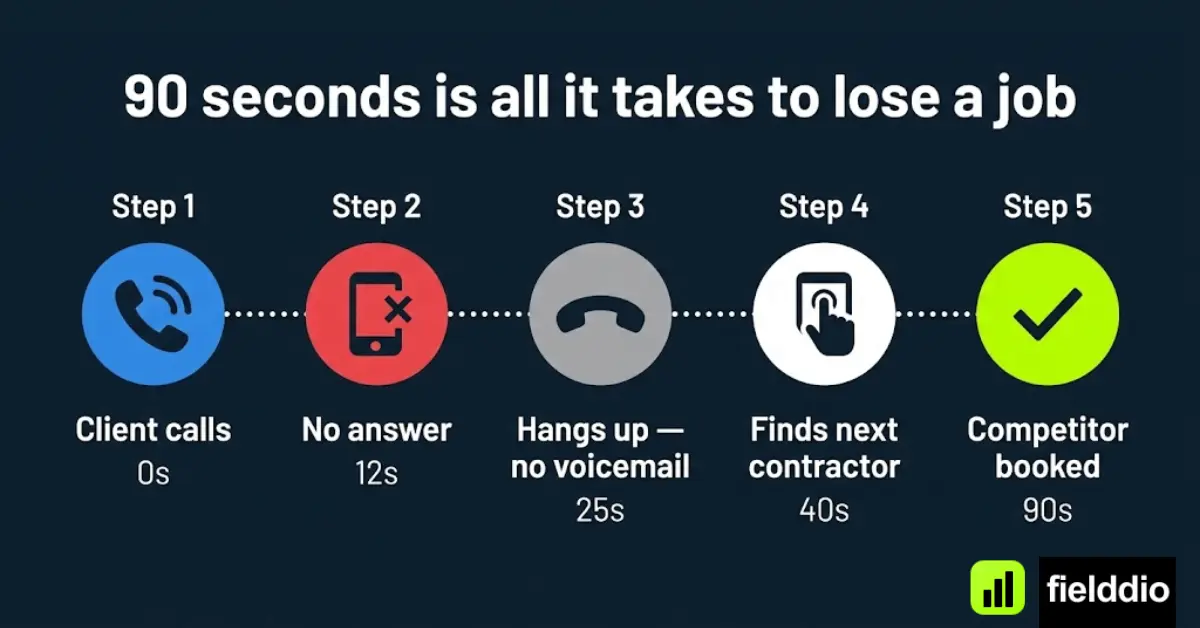


You picked up a job at 7 AM. By the time you called back the second lead at noon, they’d already hired someone else. Sound familiar? In field service, the business that responds fastest usually wins. That’s the core problem Workiz was built to solve — and in this review, we’ll show you exactly how it does it.
We tested Workiz across scheduling, payments, client communication, and dispatching. Here’s our honest verdict for 2026.
What Is Workiz?
Workiz is a field service management (FSM) software founded in 2015, built specifically for home service and trade businesses. Unlike generic project management tools, every feature in Workiz is designed around how field technicians actually work: on the road, at a client’s home, juggling multiple jobs per day.
It covers the full job lifecycle — from the first phone call to the final invoice — in one platform. You get scheduling, dispatching, client CRM, invoicing, online payments, team tracking, and a client-facing booking portal.
Why Contractors Lose Jobs Before They Even Start
Many field service businesses lose revenue before a technician ever reaches the driveway. A missed call, a slow callback, or an uncertain arrival window gives a ready-to-book customer time to contact the next contractor. For urgent HVAC, plumbing, locksmith, and garage door work, the first credible response often wins.
The problem is not always a lack of demand. It is the friction between demand and dispatch. Calls arrive while the owner is driving, technicians are on jobs, and office staff are rearranging the schedule. A lead can disappear into voicemail, be copied incorrectly into a calendar, or wait too long for confirmation. After-hours inquiries are especially vulnerable because customers rarely stop searching after leaving one message.
Scheduling mistakes create a second leak. Double bookings, missing job notes, and poor technician matching lead to delays and callbacks. Weak customer communication compounds the damage: if people do not know whether their appointment is confirmed or when the technician will arrive, they may cancel or leave a poor review.
Workiz addresses these issues by connecting the first call with the customer record, schedule, dispatch board, technician updates, invoice, and follow-up. Instead of treating phone calls and field operations as separate systems, it helps contractors move a lead through one workflow. That is the practical value of an FSM platform: fewer opportunities lost between “I need service” and “your technician is on the way.”
Who Is Workiz For?
- Plumbers, electricians, HVAC technicians
- Locksmiths, garage door companies
- Cleaning services and pest control businesses
- Any field service business with 1 to 50+ technicians
- Owners who want to replace 3–4 apps with one platform
If you’re still dispatching by text, tracking jobs in a spreadsheet, or chasing paper invoices — Workiz was built for you.
Industries That Benefit Most From Workiz
Workiz is most useful in service businesses where jobs arrive by phone, schedules change during the day, and technicians need current information in the field. The platform says it is trusted by more than 120,000 field service professionals, with growing adoption among home service businesses in the North American contractor market. That is vendor-reported usage, not a guarantee of fit, but it reflects the trades Workiz is built to serve.
HVAC Companies
HVAC contractors balance emergency no-cooling or no-heat calls with installations and recurring maintenance contracts. Workiz helps dispatchers insert urgent jobs, view technician availability, and route the right skill set to the right customer. During seasonal demand spikes, automated reminders and status messages can reduce the call volume handled by the office while service-plan scheduling helps keep maintenance work organized.
Plumbing Businesses
A burst pipe cannot wait for a slow callback. Plumbing companies can use Workiz to capture the problem, prioritize urgent dispatching, and keep the customer informed as the technician travels. Field estimates and digital quote approval shorten the path from diagnosis to authorized work, while job records give the office and technician the same customer history.
Locksmith Companies
Locksmith jobs are especially sensitive to response time. Missed-call recovery and fast dispatching help the business respond while a locked-out customer is still ready to book. Mobile technicians can receive job details, update status, and collect payment in the field rather than returning paperwork to the office. Call logs also help owners review how emergency leads are handled.
Garage Door Contractors
Garage door companies manage urgent repairs, scheduled installations, estimates, and routine service across a wide territory. Route visibility can help assign a nearby technician, while appointment scheduling and automated customer updates reduce uncertainty. The same workflow benefits appliance repair, electrical, cleaning, pest control, and other mobile service teams.
If you are comparing Workiz with a broader shortlist, see Fielddio’s best field service software for small contractors and our best contractor CRM and FSM guide.
Workiz Key Features (2026)
1. Smart Scheduling & Dispatching
Workiz’s drag-and-drop calendar lets you assign jobs, move appointments, and see your entire team’s schedule in real time. The dispatch board shows who’s available, where each tech is, and what’s coming up — all at a glance.
Key scheduling features:
- Drag-and-drop job assignment
- Color-coded technician calendars
- Recurring job scheduling (weekly, monthly, custom)
- Automated appointment reminders via SMS and email
- Online booking portal for self-scheduling clients
Double-booked jobs and missed appointments are one of the biggest sources of 1-star reviews in field service. Workiz’s scheduling engine prevents overlaps automatically and sends reminders to clients before every visit — so your techs show up where they’re supposed to, every time.
2. Client Communication Hub
Workiz centralizes all client communication — calls, texts, emails — inside one inbox. Every message is tied to a client record and a job, so nothing falls through the cracks.
The platform includes a built-in VoIP phone system, which means you can make and receive calls directly in Workiz. Every call is logged automatically. Miss a call? Workiz logs it and can send an automatic follow-up text so you never lose a lead to voicemail again.
Features:
- Built-in VoIP phone system with call recording
- Two-way SMS and email from the job record
- Missed call auto-responder
- Automated follow-ups and review requests
- “On my way” notifications sent automatically to clients
“Where are you?” is one of the most damaging things a client can say — it signals frustration and kills your chances of a 5-star review. Workiz’s automated “on my way” texts eliminate that entirely.
Why Missed Calls Cost Contractors Thousands Every Year
Customers with an immediate service problem rarely call one contractor and wait. They may contact three or four companies within minutes, and the first business to answer clearly, collect the right details, and offer a realistic appointment often gets the job. Traditional voicemail performs poorly in that situation because it asks an impatient customer to wait without knowing when anyone will respond.
The loss is easy to underestimate because missed opportunities do not appear as canceled jobs in a report. They simply never enter the schedule. A company can have strong technicians and good reviews while still leaking revenue from unanswered calls, slow follow-up, forgotten web inquiries, and after-hours leads that competitors handle faster.
Workiz’s communication tools are designed to make that leakage more visible and recoverable. Its built-in VoIP options can keep business calls connected to the operating platform. Call logging creates a record of incoming and outgoing activity, while missed-call auto replies can acknowledge the customer quickly. Automated follow-up workflows help the office continue the conversation instead of relying on sticky notes or individual memory.
- VoIP: make and receive supported business calls within the Workiz communication environment.
- Call logging: connect call activity with the customer and job history.
- Missed-call auto reply: respond by text while the customer is still looking for help.
- Automated follow-up: keep estimates, open leads, and customer requests from going quiet.
Phone capabilities and usage limits can vary by plan or add-on, so confirm call routing, number porting, recordings, after-hours coverage, and fees during a demo. Contractors comparing communication workflows can also review Workiz vs Jobber and Workiz vs Housecall Pro.
3. Estimates & Invoicing
Create professional estimates in the field, convert them to jobs with one click, and send invoices immediately on job completion. No paperwork. No delays. No chasing checks.
Workiz supports price books so your techs can pull up standard rates, build line items, and present a clean quote to the client on-site — all from their phone.
4. Payments — Collect on the Spot
Workiz Pay lets your technicians collect payment on the spot using a mobile card reader or by sending a payment link via text. Clients can pay by credit card, debit, or ACH — and you get the money fast.
No more chasing invoices. No more “I’ll mail you a check.” The job ends, the payment happens.
Payment features:
- In-field card reader (tap, chip, swipe)
- Text-to-pay links
- Online payment portal for clients
- Automatic payment reminders for open invoices
- QuickBooks integration for bookkeeping
5. GPS Tracking & Team Management
See where every technician is at any moment on a live map. Assign the closest available tech to an emergency call. Track drive time, job time, and idle time automatically.
Managers get automated time sheets — no more manual clock-ins or disputes at payroll.
6. Reviews & Reputation
After each completed job, Workiz automatically sends a review request to the client. Happy customers get a direct link to your Google Business profile. Unhappy ones get a private feedback form — so you handle issues before they become public 1-star reviews.
How Fielddio Evaluates FSM Software
Fielddio evaluates field service management software against real contractor workflows, not feature counts alone. We assess scheduling quality, dispatching efficiency, communication tools, payment collection, automation, mobile usability, customer support, onboarding speed, and pricing transparency.
We also consider how easily office staff and technicians can complete common tasks under pressure. A feature only adds value when the team can use it reliably. Pricing and packaging change, so readers should verify current plan limits and total costs; our dedicated Workiz Pricing 2026 guide is the best place to compare the latest plan structure.
Workiz Pricing 2026
| Plan | Price | Best For |
|---|---|---|
| Lite | Free (up to 2 team members) | Solo operators, low job volume |
| Kickstart | $225/mo (3 users) | Small crews needing unlimited jobs |
| Standard | $275/mo (5 users) | Small teams needing QuickBooks sync |
| Pro | $325/mo (5 users) | Teams wanting the Genius AI tools |
| Ultimate | Custom pricing | Multi-location and franchise operations |
Annual billing takes roughly 17% off each paid plan — about $187/mo for Kickstart, $229/mo for Standard and $270/mo for Pro. The Genius Phone, Genius Answering and Genius Marketing modules are add-ons billed on top of the plan price. Figures verified against the official Workiz pricing page in August 2026; our full breakdown is in the Workiz Pricing 2026 guide.
Free trial: Workiz offers a 7-day free trial — no credit card required. Start your free trial here →
Workiz Pros and Cons
✓ Pros
- All-in-one platform (no app juggling)
- Built-in VoIP — never miss a lead
- On-the-spot payment collection
- Automated client communication
- GPS tracking for technicians
- Easy to learn — onboarding in hours
- Strong mobile app (iOS + Android)
✗ Cons
- Paid plans start at $225/mo — well above Jobber and Housecall Pro
- Free Lite plan is capped at 2 users and a limited job volume
- VoIP (Genius Phone) is a paid add-on on every plan
- Reporting limited on lower tiers
- Integrations fewer than ServiceTitan
Workiz vs ServiceTitan
Workiz and ServiceTitan overlap in scheduling, dispatching, customer management, payments, and reporting, but they usually serve different operational stages. Workiz is generally positioned for small and mid-sized contractors that want an all-in-one system without an enterprise-scale implementation. ServiceTitan is built for larger home-service organizations that need deeper configuration, reporting, marketing, and multi-location controls.
| Comparison | Workiz | ServiceTitan |
|---|---|---|
| Best fit | Small to mid-sized contractors | Large and enterprise operations |
| Setup and complexity | Faster, lighter implementation | Deeper configuration and training |
| Pricing approach | Tiered plans and add-ons | Custom enterprise-oriented quote |
| Operational depth | Strong core FSM and communications | Extensive enterprise controls |
ServiceTitan’s greater depth can be valuable for a large fleet, but it may bring more cost, setup work, and process complexity than a smaller contractor needs. Workiz is often easier to adopt when the goal is to centralize calls, jobs, technicians, and payments quickly. For additional options at both ends of the market, review our best Workiz alternatives.
Workiz vs. Competitors
| Feature | Workiz | Jobber | Housecall Pro |
|---|---|---|---|
| Built-in VoIP | ✓ | ✗ | ✗ |
| In-field payments | ✓ | ✓ | ✓ |
| GPS tracking | ✓ | ✓ | ✓ |
| Missed call auto-response | ✓ | ✗ | ✓ |
| Online booking portal | ✓ | ✓ | ✓ |
| Starting price | Free (2 users), then $225/mo | $49/mo | $79/mo |
Frequently Asked Questions
Is Workiz worth it?
Workiz can be worth it for a field service company that needs stronger scheduling, dispatch, customer communication, and payment collection in one system. Its value depends on whether the team uses those workflows consistently and whether recovered jobs or saved office time outweigh the subscription and add-on costs.
Is Workiz good for HVAC companies?
Yes. HVAC companies can use Workiz for emergency call intake, technician routing, customer updates, estimates, invoicing, and recurring maintenance contracts. It is particularly useful during seasonal demand spikes when dispatchers must adjust the schedule quickly.
Does Workiz include call tracking?
Workiz offers built-in communication features that can include VoIP, call logging, recordings, analytics, and missed-call workflows. Availability can depend on the selected plan and add-ons, so confirm included minutes, numbers, routing, recording rules, and extra charges before buying.
Does Workiz integrate with QuickBooks?
Yes, Workiz supports QuickBooks integration for accounting workflows. Ask which QuickBooks version is supported and test how customers, invoices, payments, taxes, and corrections synchronize before moving live.
Is Workiz better than Jobber?
Workiz is often better for contractors who prioritize built-in call management, missed-call recovery, rapid dispatch, and communication automation. Jobber may be preferable for teams that prioritize its client portal and broader reporting structure. Our detailed Workiz vs Jobber comparison covers the trade-offs.
Can Workiz replace multiple software tools?
Workiz can consolidate CRM records, scheduling, dispatching, estimates, invoices, payments, technician tracking, and parts of the phone and messaging stack. Whether it replaces every tool depends on accounting, marketing, inventory, analytics, and phone requirements.
Is Workiz suitable for solo contractors?
It can be, especially when a solo operator misses calls while driving or working and wants scheduling, customer records, invoicing, and follow-up in one place. A very new business with low job volume should compare the full monthly cost with simpler tools before committing.
Does Workiz offer a mobile app?
Yes. Workiz offers mobile apps for field use, allowing technicians to view job details, update status, communicate, prepare estimates or invoices, and support payment collection. Test the app on the devices and network conditions your crew actually uses.
How long does Workiz onboarding take?
Basic onboarding can be relatively fast for a small team, but the timeline depends on data cleanup, customer imports, price books, phone configuration, automations, permissions, and training. A simple operation may become functional quickly; a multi-location company should plan a staged rollout and testing period.
What industries use Workiz most?
Workiz is commonly used by HVAC, plumbing, locksmith, garage door, electrical, appliance repair, cleaning, junk removal, pest control, and other home service businesses. The strongest fit is usually a mobile team handling multiple customer jobs each day.
How does Workiz compare with Housecall Pro?
Both platforms cover core field service workflows. Workiz places particular emphasis on communication and call management, while Housecall Pro has its own strengths in home-service operations and user experience. See the full Workiz vs Housecall Pro comparison.
Final Verdict: Is Workiz Worth It?
For most small to mid-size field service businesses, yes — Workiz is worth it. The combination of built-in VoIP, automatic follow-ups, on-site payments, and real-time scheduling makes it one of the most complete FSM platforms available in 2026.
The ROI math is simple: if Workiz helps you close even one extra job per week that you would have lost to a missed call or a scheduling mistake, it pays for itself many times over.
If you’re a solo operator who just needs basic scheduling and invoicing, Jobber might be more affordable. If you’re running a large fleet (50+ techs), ServiceTitan scales better. But for the 90% of field service businesses in between, Workiz hits the sweet spot.
Ready to stop losing jobs to missed calls?
Try Workiz free for 7 days — no credit card required.

Related Articles
This post contains affiliate links. If you make a purchase through these links, we may earn a commission at no extra cost to you.
2 thoughts on “Workiz Review 2026: Is It Worth It for Field Service Businesses?”