

Housecall Pro Is Retiring Bill Pay: What Contractors Need to Do Before December 31, 2026
Housecall Pro Bill Pay is retiring on December 31, 2026. After that date, you won’t be able to pay vendors through Housecall Pro anymore. If you use Bill Pay to send checks or ACH payments to your supply houses, subcontractors, or equipment dealers, you have one quarter to move those payments somewhere else.
The good news: nothing about this is complicated. The bad news: Housecall Pro won’t move anything for you. Your vendor list, their bank details, and your payment setup all have to be rebuilt in a new tool. This guide covers what’s disappearing, the exact shutdown calendar, what to save, which replacements to consider, and whether this changes how you should think about Housecall Pro as your field service management software.
Housecall Pro Bill Pay stops working on December 31, 2026. It stays read-only until March 31, 2027, then it is removed along with your bill history, vendor info, and Bill Inbox attachments. Before December 31: (1) export your Housecall Pro Bill Pay history as CSV, (2) collect vendor bank/ACH details directly from vendors, (3) set up a new provider such as Bill.com, Melio, QuickBooks Bill Pay, or your bank’s bill pay, and send one small test payment.
What Is Housecall Pro Retiring, Exactly?
Housecall Pro Bill Pay is the accounts-payable tool inside the Expense Management area (formerly branded HCP Money). It let you pay any vendor by mailed check or ACH straight from your funded Expense account, upload invoices with auto-fill, and sync bills to QuickBooks Online. That’s the piece going away.
What stops working in Housecall Pro Bill Pay
- Creating and sending bill payments to vendors, by check or ACH
- Managing payments inside Bill Pay: drafts, submissions, and scheduling
- The Bill Inbox as a place to store vendor invoices and receipts (after March 31, 2027)
- Stored vendor records in the Bill Pay Vendors tab (after March 31, 2027)
What the notice doesn’t mention
Housecall Pro’s announcement is specific to Bill Pay. It doesn’t announce changes to how you collect money from customers (card, ACH, financing on invoices) or to Expense Cards. Don’t assume either way: if you rely on those tools, confirm their status with Housecall Pro support before you plan your 2027 stack.
Housecall Pro Bill Pay Shutdown Timeline
There are three dates that matter. Housecall Pro added a three-month read-only window after the cutoff so you can retrieve records, but it explicitly recommends finishing your migration before December 31 rather than counting on that grace period.
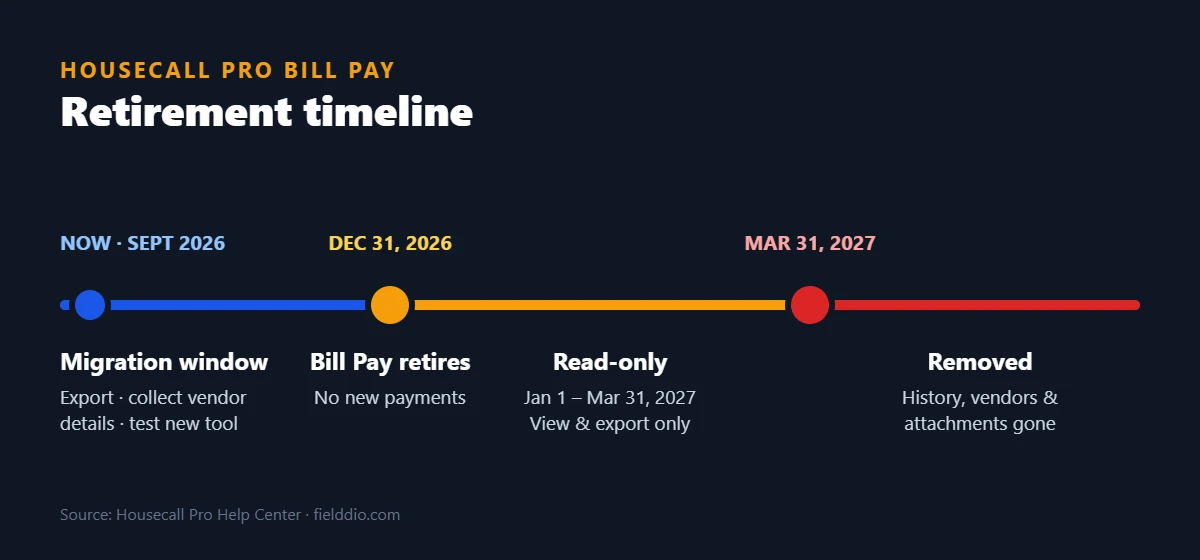
| Date | What happens | What you can still do |
|---|---|---|
| Now → Dec 31, 2026 | Bill Pay works normally | Pay bills, export history, save vendor info, set up a new provider |
| Dec 31, 2026 | Bill Pay retires and becomes read-only | No new payments; no payment management |
| Jan 1 – Mar 31, 2027 | Read-only access | Review and export payment history, vendor info, Bill Inbox documents |
| After Mar 31, 2027 | Bill Pay removed from the platform | Nothing: data stored only in Bill Pay is no longer accessible |
Housecall Pro says mailed checks take about 7–10 business days to reach a vendor, versus 2–4 for ACH. If you pay big supplier invoices at month-end, your last Housecall Pro Bill Pay check run realistically needs to go out in mid-December, and your new tool should already be tested by then. The holiday bank closures make that window even tighter.
What Data Should You Export Before Bill Pay Shuts Down?
Anything that lives only inside Housecall Pro Bill Pay disappears after March 31, 2027. Your accountant will still want those records at tax time, and if a vendor ever disputes a payment, you’ll want proof. Save these three things, and store them somewhere that doesn’t depend on Housecall Pro.
- Bill Pay transaction history (CSV). Go to Housecall Pro Bill Pay, apply any filters you want, and click Export in the upper-right. The CSV only includes the bills shown in the table, so clear your filters if you want everything.
- Vendor payment details. Open the Vendors tab and list every vendor you pay through Housecall Pro, with how you pay them (check or ACH).
- Bill Inbox attachments. Download any invoices, receipts, or bills you need for your records. The CSV export won’t include these files.
Why you need to contact vendors directly
Housecall Pro states that vendor bank and ACH details will not transfer automatically to a new provider, and it recommends asking vendors directly for their banking information. Budget time for this. Some supply houses take a week or more to return an ACH form, and vendors you pay by mailed check will need to be set up from scratch.
Payment-change requests are a common target for fraud. Never accept new vendor bank details from an unexpected email alone: confirm by phone using a number you already have on file, and store banking info through your normal secure process, not in a shared spreadsheet.
If you use the QuickBooks Online sync
Housecall Pro Bill Pay syncs bills, vendors, and payments to QuickBooks Online and records transactions under an expense account called Housecall Pro Money – Bill Pay. Before the cutoff, make sure every submitted payment has cleared and shows as paid in QuickBooks. After you switch providers, ask your bookkeeper how to categorize payments going forward so your books don’t end up split across two accounts with no clear break.
The Best Housecall Pro Bill Pay Alternatives
Housecall Pro itself suggests four types of replacements. Here’s how they compare for a typical 2–50 tech service business. We’ve kept this qualitative on purpose: fees and plan limits for these tools change often, so check each provider’s current pricing page before you commit.
| Option | Best for | Watch out for |
|---|---|---|
| BILL (Bill.com) | Growing shops with an office manager or bookkeeper who needs approval workflows and a dedicated AP system | Check how approver seats are billed if several people only need to approve bills |
| Melio | Owner-operators and small teams who want simple vendor payments by ACH, card, or check | Confirm current fees for checks, card payments, and fast transfers |
| QuickBooks Bill Pay | Businesses already on QuickBooks Online that want bills and payments in the same ledger | Features and included payments depend on your QuickBooks plan |
| Your business bank’s bill pay | Low-volume payers who send a handful of checks a month | Usually no invoice capture or accounting sync; more manual reconciliation |
How to choose in 5 minutes
- You already live in QuickBooks Online? Start with QuickBooks Bill Pay. It’s the path with the fewest moving parts.
- You have approvals (a PM approves, the owner pays)? Look at BILL first.
- You pay a few vendors a month and want it simple? Compare Melio and your bank’s bill pay.
- You pay subcontractors (1099)? Ask each provider how it handles vendor tax info before you pick.
How to Migrate Off Housecall Pro Bill Pay: 5-Step Plan
Here’s a practical sequence for moving off Housecall Pro Bill Pay between October and December. Most small contractors can finish it in two or three focused sessions, plus waiting time for vendors to send back their details.
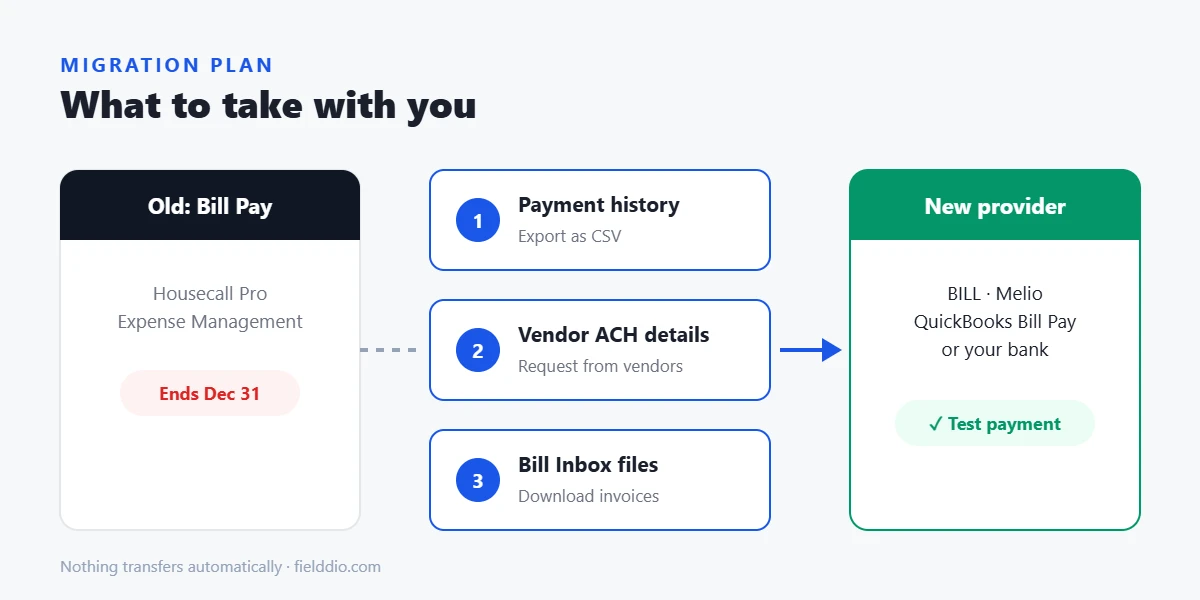
- Week 1: Export and inventoryExport your full Housecall Pro Bill Pay CSV, download Bill Inbox attachments, and build a vendor list with payment method, typical amount, and due dates.
- Week 1: Pick your providerUse the “how to choose” rules above. If you’re on QuickBooks Online, loop in your bookkeeper before you sign up for anything.
- Weeks 2–4: Collect vendor detailsEmail every vendor for current ACH details, then verify by phone. Start with your highest-volume supplier.
- Weeks 4–6: Send one small test paymentHousecall Pro recommends it, and so do we. It confirms vendor info, your funding account, and the approval flow before real money moves.
- By mid-December: Cut overPay new bills from the new tool, let any in-flight Housecall Pro checks clear, and make sure your Expense account balance is where you want it.
Subject: Updating how we pay you, action needed by [date]
Hi [Vendor name], we’re switching the system we use to pay vendor invoices before the end of the year. To keep your payments on time, please send your current ACH details (bank name, routing, and account number) or confirm that you prefer a mailed check. We’ll confirm the details with you by phone before sending any payment. Thanks, [Your name], [Company], [Phone]
5 Mistakes to Avoid When Replacing Housecall Pro Bill Pay
Most problems in an accounts payable switch come from timing and missing data, not from the new tool itself. These are the five to watch for, in the order they tend to bite.
- Counting on the read-only window. After December 31 you can still view and export records, but you can’t pay anyone from Housecall Pro Bill Pay. Bills due in the first week of January have to go out from your new provider.
- Exporting with filters still on. The CSV only includes the bills visible in the table. Clear every filter before you click Export, then compare the row count with what you see on screen.
- Forgetting Bill Inbox files. Invoice PDFs and receipts attached in the Bill Inbox are not part of the CSV. Download the ones your accountant or tax preparer will ask for.
- Copying bank details from old emails. Ask vendors for current ACH details and confirm them by phone. Old or forwarded emails are exactly where payment fraud slips in.
- Skipping the test payment. A small test payment catches a wrong routing number, a funding issue, or a missing approval step before a real supplier invoice is late.
A simple rule of thumb: treat December 1 as your own deadline for having the new provider live. That leaves December for clean-up, final check runs, and reconciliation instead of setup under pressure.
Does This Change Whether Housecall Pro Is Right for You?
For most contractors, losing Housecall Pro Bill Pay is an inconvenience, not a reason to leave. It was a free add-on, and dedicated AP tools often do vendor payments better. Still, it’s a fair moment to look at the bigger picture, because Housecall Pro’s pitch leans heavily on having your money tools in one place.
- Scheduling, dispatch, and customer payments work well for you
- Bill Pay was a minor convenience
- You already use QuickBooks for the books
- You chose Housecall Pro mainly for “all money in one place”
- You’re already paying for workarounds
- Your real bottleneck is winning jobs, not running them
If you land in the right-hand column, compare before your renewal instead of after. Our software scoring method explains how we weigh features, pricing, and fit for teams of 2–50 techs.
And if losing estimates to slow follow-up is where your revenue actually leaks, that’s a different problem than accounts payable. It’s the one sales-focused CRMs like DripJobs are built to solve. Our DripJobs vs Jobber comparison breaks down that sales-versus-operations split. Just note that DripJobs is not a vendor bill pay tool, so you’d still need one of the options above.
Rethinking your software stack while you’re at it?
See how DripJobs handles lead follow-up, proposals, and customer payments for contractors who sell on estimates.
Visit DripJobs → Or read our full DripJobs review firstFrequently Asked Questions
When is Housecall Pro Bill Pay being discontinued?
Housecall Pro Bill Pay retires on December 31, 2026. From that date you can no longer make or manage bill payments through Housecall Pro. It stays read-only from January 1 to March 31, 2027, then it’s removed from the platform entirely.
Will my Housecall Pro Bill Pay history be deleted?
Yes, after March 31, 2027. Housecall Pro says bill payment history, vendor information, and Bill Inbox attachments will no longer be accessible after that date. Export your CSV history and download attachments before then, ideally before December 31, 2026.
Will Housecall Pro transfer my vendors to a new provider?
No. Housecall Pro does not automatically transfer your Bill Pay account, vendors, or payment information to another provider. You’ll need to set vendors up again in the new tool and request their ACH details directly from them.
What is the best replacement for Housecall Pro Bill Pay?
Housecall Pro suggests Bill.com, Melio, QuickBooks Bill Pay, or your business bank’s bill pay tools. If you already use QuickBooks Online, QuickBooks Bill Pay is usually the simplest switch. Shops with approval workflows often prefer BILL, and small teams may find Melio or bank bill pay enough. Compare current pricing on each official site, and see our accounting software guides.
Is Housecall Pro getting rid of customer payments too?
The retirement notice only covers Bill Pay, the tool for paying your vendors. It doesn’t announce changes to collecting payments from customers. Confirm with Housecall Pro support if you depend on other money features.
Bottom Line: Don’t Wait for the Read-Only Window
The official Housecall Pro Bill Pay shutdown is December 31, 2026, but the real deadline is earlier. Mailed checks take time, vendors are slow to send banking details, and nobody wants to debug a new payment tool the week of New Year’s. Treat March 31, 2027 as a safety net for pulling records, not as extra time to keep paying bills.
Three moves cover it: export your history and attachments, re-collect and verify vendor bank details, and get a new provider tested with a small payment by early December. Then, while you’re thinking about your tools anyway, ask whether your field service software is still the right fit for where your business is going. Our contractor CRM comparison and missed call opportunity calculator are good places to start.
- Housecall Pro Help Center: Bill Pay is retiring, what you need to do before December 31, 2026
- Housecall Pro Help Center: Bill Pay overview guide & FAQ
- Housecall Pro Help Center: Bill Pay QuickBooks Online integration
Details checked on September 28, 2026. Housecall Pro may update its timeline; confirm on the official help center before acting.
This post contains affiliate links. If you make a purchase through these links, we may earn a commission at no extra cost to you.